
The short answer
Internal linking does three things for a law firm site: it tells search engines which of your pages matter most, it gives a reader on an article a route to the page that actually converts, and it stops new content landing with nothing pointing at it. The mechanics are dull and the compounding is real — anchor text that describes the destination, hubs that link to their clusters, and clusters that link back.
Here's a diagnostic worth running before you renew an SEO retainer, and a good companion to the wider 90-minute SEO audit. Crawl your own site — Screaming Frog's free tier handles a small firm site — and count the internal links pointing at your most valuable practice area page.
On a lot of law firm sites the answer is one or two, both from the footer, which is the weakest place a link can live. The "Practice Areas" overview page that ought to be feeding authority down to it often doesn't link to it at all. Meanwhile the blog posts that would make natural feeders link out to Wikipedia and back to the homepage and nowhere else useful.
That's a structural problem, and no amount of monthly retainer fixes it if nobody is looking at the structure. It's also the rare SEO problem you can fix yourself, for free, in an afternoon — which is the whole reason it's worth understanding rather than outsourcing.
This is the most underrated SEO lever in legal. Free, fully under your control, faster than backlinks. And almost every law firm site we audit has it backwards.
What internal linking actually does
Two things, and they're separable.
It signals to search engines what your site is about. When 15 pages on your site link to your Personal Injury page using anchor text that includes "personal injury" or close variants, the search engine takes that as a strong claim that this site has topical authority on personal injury law. Anchor text on internal links is one of the loudest topical signals you have. Most sites use it almost randomly.
It distributes ranking authority. Authority flows from your homepage through internal links to other pages. A page linked from the homepage gets a meaningful slice of homepage authority. A page buried four clicks deep gets a small fraction of that. PageRank as a concept is twenty-five years old and Google has restructured the algorithm many times, but the underlying physics ("links pass authority, deeper pages get less") still holds.
Practically: every page you want to rank needs multiple internal inbound links, with anchor text that matches the target keyword, from pages that themselves carry authority.
That sentence is the whole post. Everything else is detail.
The hub-and-spoke architecture
For a law firm site, the structure that consistently outperforms is hub-and-spoke. It is the same shape as a proper law firm knowledge base rather than a blog, and the linking is what turns a pile of pages into one.
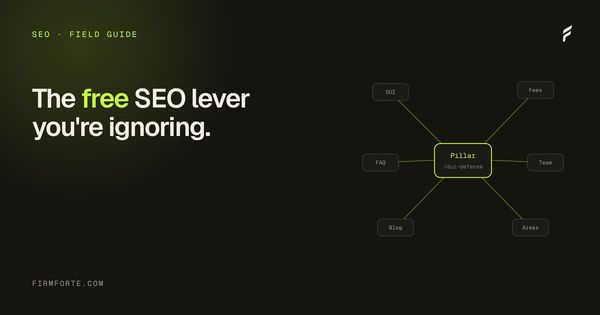
One pillar page per practice area is the hub. The hub is a long, substantive page (2,000 words minimum) that covers the practice area broadly. Topic-specific pages are the spokes. Each spoke covers one narrow question or sub-topic in depth. The hub links down to every spoke. Every spoke links up to the hub. Spokes that share themes link laterally to each other.
What that looks like for a personal injury practice:
HUB
└── /personal-injury/             (2,500-word pillar page)
    │
    SPOKES
    ├── /personal-injury/car-accidents/
    ├── /personal-injury/slip-and-fall/
    ├── /personal-injury/wrongful-death/
    ├── /personal-injury/medical-malpractice/
    └── /personal-injury/dog-bites/
    │
    SUB-SPOKES (one or two levels deeper)
    ├── /personal-injury/car-accidents/whiplash-settlement-amount/
    ├── /personal-injury/car-accidents/uninsured-motorist/
    ├── /personal-injury/car-accidents/passenger-claims/
    └── /personal-injury/slip-and-fall/grocery-store/
Links flow like this:
- The hub links down to all five spokes (in the body, not just a sidebar)
- Each spoke links back up to the hub at least twice in the body content
- Each spoke links laterally to one or two related spokes
- Each sub-spoke links up to its parent spoke and to the hub
- Blog posts about personal injury topics link into the relevant spoke, not just the hub
Done this way, every URL in the tree is reachable in 2 clicks from the hub. The hub itself gets 5-plus inbound contextual links from spokes and many more from sub-spokes. Authority concentrates on the hub, which is exactly the page you want to rank.
A site with three practice areas done this way has roughly 35 to 50 internal contextual links between practice-related pages. Most law firm sites we audit have 3 or 4.
The five anchor text mistakes
Anchor text is the single highest-signal element of an internal link. Get it wrong and the link contributes nothing topically. Get it right and you compound authority on the target.
Five common patterns to stop using, with before-and-after examples.
One: "Click here" and "Learn more." The most expensive mistake because the link tells the engine nothing about the target.
Bad: "If you've been injured in a car accident in Texas, learn more about your options."
Good: "If you've been injured in a Texas car accident, the statute of limitations is two years from the date of injury."
Two: the firm name as anchor for everything.
Bad: "Adams Park Personal Injury handles claims across Travis County."
Good: "Our personal injury practice handles claims across Travis County."
The first version trains the engine to associate the firm name with every page rather than the practice area. The second version tells the engine the target page is about personal injury.
Three: identical anchor to multiple targets.
If three different pages on your site each link with the anchor "personal injury attorney" but point to different URLs, the engine has no way to know which target is canonical. Pick one canonical URL for that anchor, point everything that uses it there, and use varied phrasing for the other targets.
Four: anchor text mismatching the target page's H1.
Bad: anchor text "car accident lawyer," target page H1 "Auto Collision Practice"
Good: anchor text "car accident lawyer," target page H1 "Texas Car Accident Lawyer"
The engine reconciles anchor text with the target's on-page signals. Big gaps signal confusion.
Five: over-linking the same page.
If your homepage links to the contact page 12 times with the anchor "Free Consultation," the engine starts to discount the signal. Two or three contextual links per page is the natural ceiling. More than that reads as spam patterns.
Contextual links versus navigation links
Internal links fall into two categories with materially different weight.
Navigation links appear on every page (the main menu, footer, sidebar). They count, but search engines have learned to discount them. Their placement isn't a fresh editorial decision; it's structural. Every page on the site has the same nav.
Contextual links appear inside the body content, where someone (you) chose to link a specific phrase to a specific page. These carry meaningfully more weight because they signal editorial judgment about what's actually relevant. This is why the depth of your practice-area pages matters twice over: they are both the pages you want ranked and the pages with the most natural opportunities to link.
Every page you care about ranking needs at least 5 contextual internal links pointing to it, from related body content on other pages. Not navigation links. Real prose links from articles and pages that discuss the same topic.
Most law firm sites we audit have zero contextual internal links between any of their practice-area pages. The pages exist in isolation, connected only by the nav menu, which Google treats as low-signal.
A worked paragraph rewrite
A real example of how a single paragraph on a hub page should change.
Bad version (one link, generic anchor):
"Our personal injury practice covers a range of cases including car accidents, slip and fall, wrongful death, and medical malpractice. Read more about our services."
Good version (five contextual links, topic-named anchors):
"Our personal injury practice handles Texas car accidents, slip and fall cases, wrongful death claims, and medical malpractice litigation. Each carries different rules around statutes of limitations and damages caps, covered in the practice-specific pages."
Same firm, same information, same paragraph length. Five inbound contextual links instead of one generic one. Multiply this across 50 pages and the topical signal compounds quickly.
The Saturday-morning playbook
The pattern that makes this tractable in one sitting:
Pick your top three practice areas. Open the hub page for each in a tab. Open every related spoke and sub-spoke in tabs. Open every blog post tagged to those practices in tabs. That's probably 15 to 30 tabs.
Then walk through them, one at a time, doing four things:
- Every time the page mentions a related topic that has its own URL, add a contextual link to that URL with topic-relevant anchor text.
- Every spoke and sub-spoke page should link back up to its hub at least twice in the body content, not just in the breadcrumb.
- Every blog post on a topic should link to the relevant spoke or sub-spoke once in the first half of the post and once in the last paragraph.
- Remove "click here" and "learn more" anchors. Replace them with topic-named anchors.
An hour per practice area, done in one focused sitting. Three practice areas in one Saturday morning. The site doesn't need new content, new backlinks, or new schema — just the existing content connected the way an engine expects to find it. How much that moves rankings depends on your market and what your competitors have already done, so treat it as removing a known handicap rather than as a lever with a promised number on it.
The Screaming Frog audit
Free tool, free version handles up to 500 URLs (plenty for any law firm site). Three reports to run:
Internal Inbound Links per URL. Look for pages with fewer than 3 internal inbound links. Those are orphan or near-orphan pages, and they're not ranking, regardless of how well-written they are.
Anchor Text by Target URL. Look at the anchor text distribution to your top pages. Healthy distributions have variety: the target page's primary keyword anchor appears 30 to 50% of the time, with related variants and brand-name anchors filling the rest. Distributions that are 90% identical anchor text or 90% "click here" need a fix.
Crawl Depth. Look for pages more than 3 clicks from the homepage. Those pages are getting starved of authority. If they're important pages, link directly to them from a closer page (the hub, or a sub-spoke).
The whole audit takes one focused afternoon. Cataloguing fixes and applying them adds another two. So roughly a full day to fix three months of agency work. Most law firm sites pay agencies $5,000 a month for less than this.
What's compounding here
The reason internal linking works disproportionately on law firm sites: most of the competition isn't doing it. The agencies that charge five figures a month don't include internal linking in their workflow because it's labor that doesn't produce reportable metrics. They focus on things they can ship (blog posts, backlink outreach, schema markup) and skip the unglamorous structural work.
Internal linking is one of the few things on a law firm site that a partner can do well without hiring anyone. It needs no new content, no budget, and no permission. A Saturday morning spent linking the existing pages together properly is genuinely worth more than another month of an agency retainer that produces posts nothing links to.
It is also the piece that keeps working after you stop. Links you place once keep passing signal for as long as the pages exist, which is not true of most of the things firms spend marketing money on.
Internal linking is the half of link building you control outright. The other half — getting other sites to reference you — needs somebody else to agree, which is why it is slower and why it is worth doing this first. Both sit inside the wider sequence in the complete guide to law firm SEO.
Questions we get about this
-
What does internal linking actually do for a law firm website?
It distributes authority between your pages, tells engines which pages you consider important, and gives readers a path from where they landed to where they can act. Most firms publish content that no other page links to, which leaves it reachable only from a listing page and invisible to anything crawling by topic. Internal linking is also the only part of link building you fully control, since it needs nobody else's cooperation. That makes it the highest-certainty work available to you.
-
What is hub-and-spoke internal linking?
One page per topic acts as the hub, the detailed pages on that topic are the spokes, and every spoke links up to the hub while the hub links down to all of them. The effect is that an engine encountering any one page can find the rest of the topic, and authority earned by any spoke flows to the hub that represents the whole subject. For a law firm the hubs are usually practice-area pages and the spokes are the questions inside that practice area. Build the hub first, because spokes with nothing to point at stay orphans.
-
What anchor text should internal links use?
Text that describes the destination page in the words a person would search for. "Click here" and "read more" describe nothing, a bare URL describes nothing, and the same anchor text pointed at five different pages tells an engine those pages are interchangeable. Write the anchor as though the link were the only thing on the page — if a reader couldn't guess where it goes, rewrite it. Vary it naturally between links to the same destination rather than repeating one exact phrase everywhere.
-
How often should a law firm audit its internal links?
Once a quarter is enough for most firms, plus a check whenever you publish. The two things to look for are pages with no inbound internal links at all and links pointing at pages that no longer exist. A crawler will find both in minutes; the fix is usually adding two or three contextual links from related pages, not restructuring the site. Do it on a schedule, because orphaned pages accumulate quietly and each one is content you already paid for and can't be found.