
The short answer
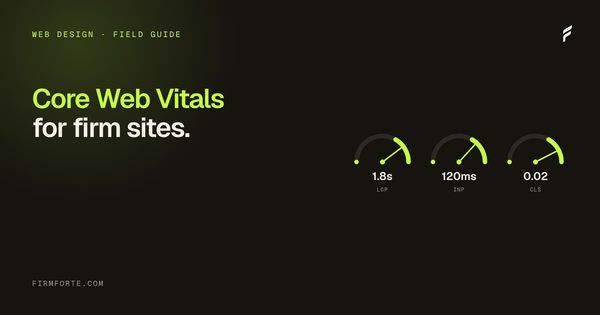
Three measurements of how a page feels to use: LCP, whether the main content loads within 2.5 seconds; INP, whether a tap responds in under 200 milliseconds; and CLS, whether the layout stays still instead of jumping while you read. They're a real but small ranking factor. The bigger reason to care is that a slow, jumpy site loses people who were ready to call.
Core Web Vitals are Google's three page-experience metrics, and in plain language they measure how fast your main content loads, how quickly the page reacts when someone taps it, and how much the layout jumps around while it loads. The targets: main content within 2.5 seconds, a tap response under 200 milliseconds, and almost no unexpected shifting. They're a confirmed ranking factor, and since most sites still fail them, passing is a genuine edge.
Here's what each one means, the number to hit, and how to tell whether your firm's site measures up.
What are Core Web Vitals, in plain language?
They're three specific measurements of how a page feels to use, each with a "good" threshold. Google's own definition sets them as LCP (loading) at 2.5 seconds or less, INP (responsiveness) under 200 milliseconds, and CLS (visual stability) below 0.1. Hit all three for most of your visitors and your site passes; miss any one and it doesn't.
The jargon makes them sound more complicated than they are. Strip the acronyms and each maps to a frustration everyone has felt: a page that takes forever to show its content, a page that freezes when you tap a button, and a page where the thing you were about to click suddenly jumps somewhere else. Google turned those three annoyances into measurable numbers because they're what actually determines whether a page feels fast and trustworthy. For a law firm whose visitor is often stressed and on a phone, feeling fast and trustworthy is not a small thing.
LCP: does your main content load fast?
Largest Contentful Paint measures how long until the biggest, most important piece of content on the page (usually your headline and hero image) actually appears. The target is 2.5 seconds or less. Past that, visitors start to feel the page is slow, and a meaningful share leave before it finishes.
LCP problems usually come from a few predictable places: oversized images that aren't compressed, slow hosting, render-blocking scripts, or fonts that delay the text. For a law firm site, the most common culprit is a giant, unoptimized hero image on the homepage. The fixes are unglamorous and effective: compress and properly size images, use decent hosting, and stop loading scripts that hold up the first paint. This is exactly the kind of thing a lean, well-built site gets right by default and a bloated one gets wrong.
INP: does the page respond when you tap it?
Interaction to Next Paint measures how quickly the page reacts when someone interacts with it, tapping a button, opening a menu, submitting a form. The target is under 200 milliseconds. INP replaced the older First Input Delay metric in 2024 because it captures the full responsiveness of a page, not just the first tap.
Responsiveness problems come almost entirely from heavy JavaScript. When a page is running too much script, the browser gets busy and can't respond promptly to a tap, so the button feels sluggish or dead for a beat. On law firm sites this often traces back to page builders and plugin sprawl piling on scripts the site doesn't really need. The fix is reducing and deferring JavaScript, which is one more reason the underlying platform matters, a theme we get into in why website builders hurt law firm AI search. A firm's contact form or click-to-call button lagging on a phone is exactly the friction you can't afford at the moment someone decides to reach out.
CLS: does the layout stay still?
Cumulative Layout Shift measures how much the page moves around unexpectedly as it loads. The target is a score below 0.1. You've felt bad CLS when you go to tap a link and an image finishes loading above it, shoving everything down so you tap the wrong thing. It's small but genuinely infuriating, and it erodes trust.
CLS is usually the easiest of the three to fix, because the causes are specific: images and ads without reserved space, and fonts or elements that load late and push content around. Setting explicit dimensions on images so the browser reserves their space, and handling fonts so text doesn't jump, resolves most of it. For a law firm site, a stable, non-jumpy page reads as professional and competent, while a page where things lurch around as it loads reads as cheap, even when the content is excellent. Stability is a trust signal.
Do Core Web Vitals actually affect rankings?
Yes, though as a supporting factor rather than the main event. Google folded Core Web Vitals into its page-experience signals in 2021, so they're a confirmed ranking input. Content relevance still matters most, but when two pages are close on quality, Core Web Vitals act as a tiebreaker, and to pass, at least 75% of your real visitors need to have a "good" experience.
So the honest framing is: Core Web Vitals won't rocket a thin page to the top, but they can be the difference between you and an equally-good competitor, and they compound with everything else. The bigger win is often conversion, not ranking. A fast, stable site keeps the stressed visitor who'd have bounced from a slow one, and for a law firm, keeping that visitor is worth more than the marginal ranking bump. The metrics are a proxy for something real: whether your site respects the visitor's time and attention.
How many sites actually pass, and how do you check yours?
Fewer than you'd think, which is the opportunity. According to the 2025 Web Almanac, only around 48% of mobile pages and 56% of desktop pages pass all three Core Web Vitals. So a law firm site that does pass is ahead of roughly half the web, and likely half its local competitors, on a factor they're probably ignoring.
Checking yours is free. Google's PageSpeed Insights tests any URL and reports all three metrics with specific recommendations, and the Core Web Vitals report in Search Console shows how your real visitors are actually experiencing the site over time. Our Core Web Vitals checker pulls the same field data — the LCP, INP, and CLS Google records from real Chrome visitors, mobile and desktop — from a single URL. Test your homepage and a couple of practice-area pages on mobile, since that's where problems live and what Google measures. If you're failing, the fixes tend to be the same short list: optimize images, cut unnecessary scripts, and reserve space for things that load. It's also one more place where accessibility and speed overlap, since the clean, semantic construction that helps one tends to help the other, as we note in ADA accessibility for law firm websites. Passing Core Web Vitals is part of what a properly built site delivers, which is the through-line of the full guide to what a law firm website should cost, take, and leave you owning. To see where your site stands, run the free review, and every site we build is engineered to pass through our web design service.
Questions we get about this
-
What are Core Web Vitals?
Three measurements of page experience: Largest Contentful Paint for loading, Interaction to Next Paint for responsiveness, and Cumulative Layout Shift for visual stability. Google's targets are LCP at 2.5 seconds or less, INP under 200 milliseconds, and CLS below 0.1. In plain terms: the main content appears quickly, tapping something responds immediately, and the page doesn't jump around while you read it. They're measured on real visits rather than in a lab.
-
Do Core Web Vitals affect law firm rankings?
Yes, but as a small factor rather than a decisive one — relevance and authority matter far more. The honest framing is that passing won't lift a page that doesn't deserve to rank, and failing badly can cost you against an otherwise equal competitor. The stronger argument is conversion: someone who has just been in an accident and hits a page that takes six seconds goes back and taps the next firm. Fix it for the visitor and the ranking effect comes along.
-
How do I check my law firm site’s Core Web Vitals?
Use Google's PageSpeed Insights on a few key pages and read the field data section, which reflects what real visitors experienced rather than a simulated run. Check on mobile, since that's where most legal traffic and most failures are. Test the pages that matter — homepage, top practice-area page, contact — rather than only the homepage. The lab score is useful for diagnosis; the field data is what counts.
-
What usually causes a law firm site to fail Core Web Vitals?
Oversized unoptimized images, too many third-party scripts, web fonts loading late, and images or embeds without dimensions that shove the layout as they arrive. Chat widgets, tracking tags, and review carousels are common culprits because each one is added by someone who wasn't watching the cumulative cost. Start by compressing images and auditing what scripts are actually earning their place. That usually fixes most of it without touching the design.